直接答案:垦派使用 API Key 与 API Secret。
这篇教程解决什么问题?
教你从 垦派(KENPAI) 官方控制台获取 API 凭证,并在Api大全 → 个人中心 → API凭证管理中验证保存,用于域名批量解析、批量改 NS、批量添加域名等自动化操作。
详细操作步骤
以下每一步均配有官方控制台截图,请对照红框位置操作。
第1步:登录垦派
- 登录垦派域名管理后台。
官方链接: https://www.kenpai.com/
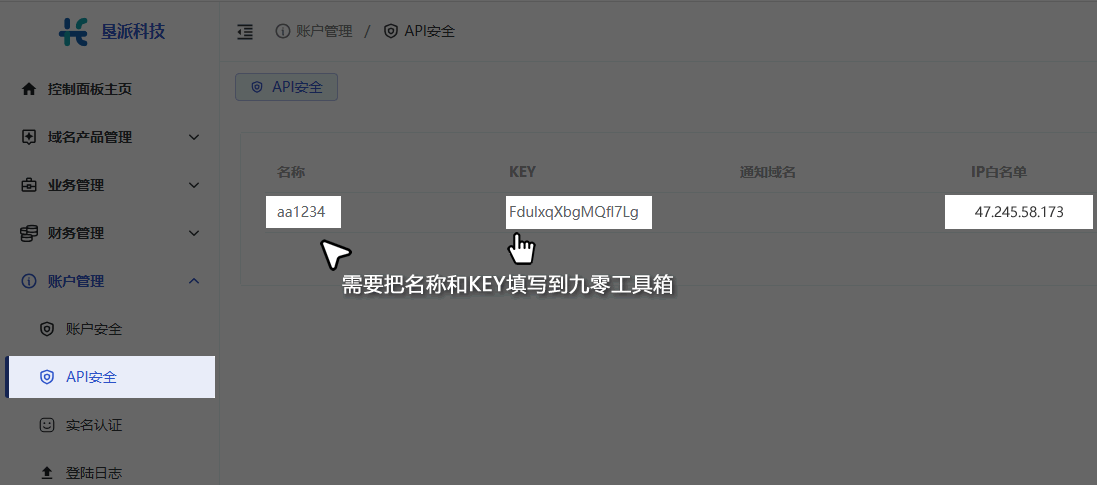
第2步:获取 API 密钥
- 进入「API 接口」或账户设置中的 API 管理。
- 复制 API Key 和 API Secret 到上方输入框。
在本站填写并验证凭证
- 登录Api大全,进入「个人中心 → API凭证管理」
- 服务提供商选择「垦派(KENPAI)」
- 填写凭证别名(便于区分多个账户)及各 API 字段
- 点击「① 验证凭证」,成功后再点「② 保存凭证」
常见问题 FAQ
如何在Api大全添加 垦派(KENPAI) API 凭证?
登录后进入个人中心 → API凭证管理,选择 垦派(KENPAI),按本文步骤获取密钥并填入对应字段,先验证再保存。
垦派(KENPAI) API 凭证验证失败怎么办?
请核对是否填错字段(如把登录密码当成 API 密码)、是否有多余空格、是否使用了正确环境的密钥;西部数码/Name.com 等需额外开启 API 权限或关闭 2FA 限制。
API 凭证在Api大全安全吗?
凭证经加密存储,全站 HTTPS 传输。请勿将密钥发给他人,建议用完可在服务商后台轮换密钥。